Skip to content
View in the app

A better way to browse. Learn more.

Tuts 4 You

A full-screen app on your home screen with push notifications, badges and more.

To install this app on iOS and iPadOS
  1. Tap the Share icon in Safari
  2. Scroll the menu and tap Add to Home Screen.
  3. Tap Add in the top-right corner.
To install this app on Android
  1. Tap the 3-dot menu (⋮) in the top-right corner of the browser.
  2. Tap Add to Home screen or Install app.
  3. Confirm by tapping Install.

Scylla - x64/x86 Imports Reconstruction 0.12.0

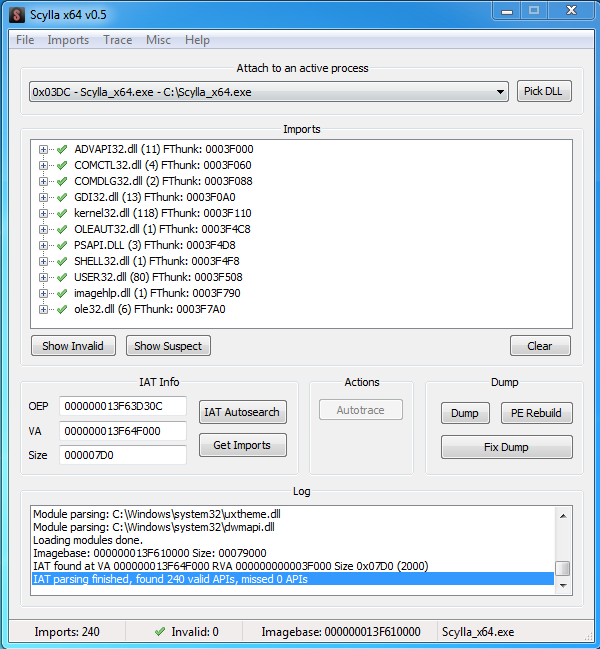
1 Screenshot

This repository contains a fork of NtQuery/Scylla with tweaks from x64dbg/Scylla as well as additional fixes, refactoring and bindings.

Scylla's key features:

  • x64 and x86 support

  • Unicode support

  • Plugin support

  • Works on Windows 7 and superior

Known Bugs

Windows 7 x64 - Sometimes the API kernel32.dll GetProcAddress cannot be resolved, because the IAT has an entry from apphelp.dll.

ImpREC Plugin Support

Some ImpREC Plugins don't work with Windows Vista/7 because they don't "return 1" in the DllMain function.

Edited by Teddy Rogers
General update...

What's New in Version 0.8

Released

  • many changes

User Feedback

Recommended Comments

unpack enigma 4.xx help

unpack enigma 4.xx help

Junior+

(edited)

gracias

Edited by unpack enigma 4.xx help

Create an account or sign in to comment

Account

Navigation

Search

Search

Configure browser push notifications

Chrome (Android)
  1. Tap the lock icon next to the address bar.
  2. Tap Permissions → Notifications.
  3. Adjust your preference.
Chrome (Desktop)
  1. Click the padlock icon in the address bar.
  2. Select Site settings.
  3. Find Notifications and adjust your preference.