
Skip to content
View in the app

A better way to browse. Learn more.

Tuts 4 You

A full-screen app on your home screen with push notifications, badges and more.

To install this app on iOS and iPadOS
  1. Tap the Share icon in Safari
  2. Scroll the menu and tap Add to Home Screen.
  3. Tap Add in the top-right corner.
To install this app on Android
  1. Tap the 3-dot menu (⋮) in the top-right corner of the browser.
  2. Tap Add to Home screen or Install app.
  3. Confirm by tapping Install.

hekliet keygemne #1

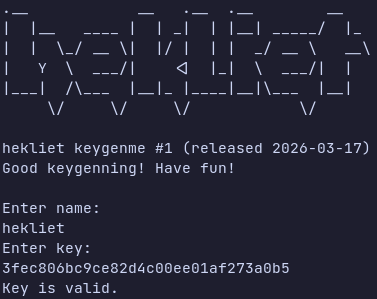
1 Screenshot

Not much to say there. Valid solution is a keygen that produces a valid key for any given name.

Binaries for Linux and Windows are provided. Plain C, no symbols stripped, compiled with -O0, so should be fairly easy to follow.

Difficulty is medium. Or perhaps easy for someone with some math knowledge. Here are some valid keys:

Name: hekliet
Key: 3fec806bc9ce82d4c00ee01af273a0b5

Name: Tuts 4 You
Key: 40105e5bb69056bd3fdc1a4496fa9430

Name: Guybrush Threepwood
Key: 400e09a63ee6d3a2bfd94d31f7369d10

User Feedback

Recommended Comments

There are no comments to display.

Account

Navigation

Search

Search

Configure browser push notifications

Chrome (Android)
  1. Tap the lock icon next to the address bar.
  2. Tap Permissions → Notifications.
  3. Adjust your preference.
Chrome (Desktop)
  1. Click the padlock icon in the address bar.
  2. Select Site settings.
  3. Find Notifications and adjust your preference.